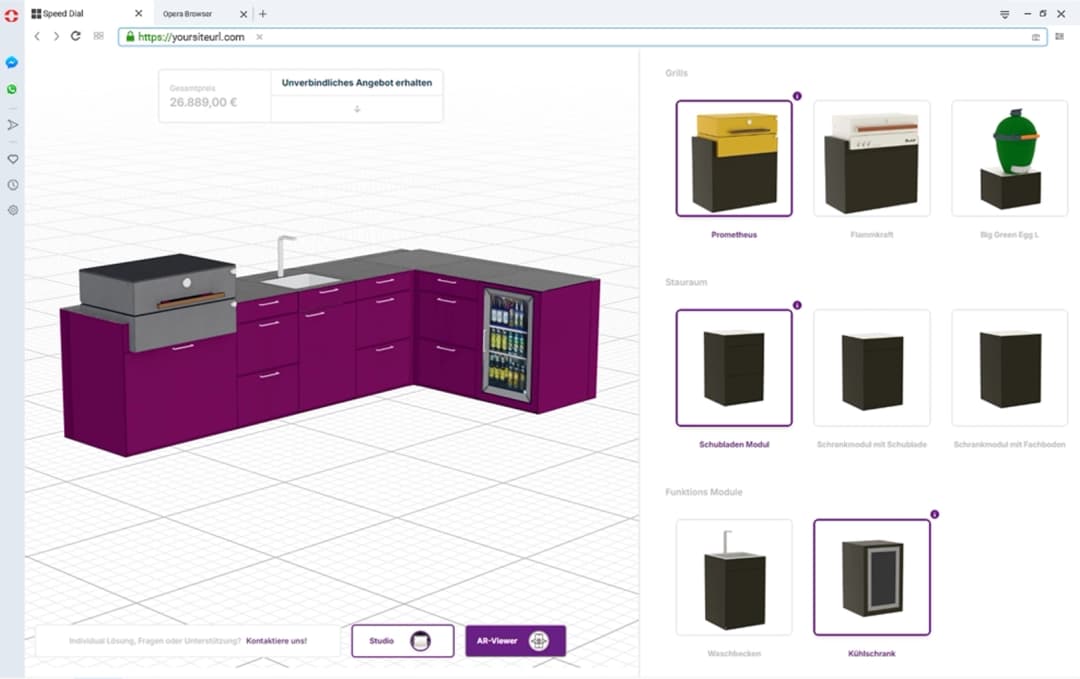



What Is Web To Print & How Does It Work
As the printing industry continues to digitize, Web to Print (W2P) platforms are revolutionizing how businesses manage and order print materials. From marketing collateral to packaging, these web to print solutions allow users to design, customize, and purchase printed products directly from a web browser — eliminating traditional barriers between customers and print providers.
Web to print software combines cloud-based technology with print automation workflows, enabling everything from custom business cards to large-scale B2B printing solutions. Whether you're a commercial printer looking to streamline operations or a marketing team needing decentralized design capabilities, understanding what is web to print technology and how it works is essential for modern business operations.
What Is Web To Print?
Web to Print (also known as web2print or W2P) is a cloud-based platform that enables users to configure, proof, and order printed items online. It's also referred to as "remote publishing" or "print e-commerce." This online printing platform allows customers to select templates, upload artwork, customize content, and see real-time previews before placing an order — all without leaving their web browser.
The fundamental concept behind web to print technology is to bridge the gap between customers and print providers through an interactive, user-friendly interface. Unlike traditional print ordering processes that require phone calls, email exchanges, and manual file transfers, web to print storefronts automate the entire workflow from design to production.
Key Characteristics of Web to Print Solutions
- Browser-Based Access: No software downloads required — everything runs in a web browser
- Template Libraries: Pre-designed templates for common print products (business cards, brochures, flyers, etc.)
- Real-Time Customization: Live editing tools for text, images, colors, and layout
- Instant Preview: See exactly how the final print will appear before ordering
- Automated Workflow: Orders flow directly to print providers' backend systems
- Variable Data Printing (VDP): Support for personalized content across multiple items
How Web To Print Works
Understanding how web to print works for printers and businesses involves breaking down the workflow into clear, actionable steps. Here's a comprehensive look at the web to print process:
Step 1: Template Selection
Users access the web to print storefront and choose from predefined templates. These templates are typically organized by product category (e.g., business cards, brochures, banners, labels, packaging). Each template serves as a starting point with locked design elements (brand guidelines, bleeds, safe zones) and customizable areas (text, images, colors).
Benefits for users:
- Maintains brand consistency automatically
- Reduces design errors with pre-validated layouts
- Speeds up the ordering process
Step 2: Design Customization
Using browser-based editors, users customize their selected template. This web to print design customization phase includes:
- Text Editing: Modify headlines, body copy, contact information
- Image Upload: Replace placeholder images with custom logos, photos, or graphics
- Color Changes: Adjust colors within brand-approved palettes
- Layout Adjustments: Resize elements, reposition content, add or remove sections
Advanced web to print software includes features like:
- Drag-and-drop interfaces
- Font libraries with brand-approved typefaces
- Image cropping and filtering tools
- Real-time spell-check and grammar suggestions
Step 3: Live Preview & Proofing
A real-time preview engine shows exactly how the final print will appear. This preview accounts for:
- Print specifications (bleeds, trim marks, fold lines)
- Color accuracy (CMYK vs RGB conversion)
- Resolution and image quality
- Production constraints (minimum quantities, paper stocks)
Users can rotate, zoom, and inspect their design from multiple angles before proceeding.
Step 4: Proof Approval
Before production begins, users review and approve a digital proof. This step ensures:
- Accuracy: All text, images, and layout elements are correct
- Compliance: Design meets brand guidelines and print specifications
- Quality: Images are high-resolution and colors are within gamut
Some web to print platforms offer multiple proofing options:
- Soft Proof: Digital preview on screen
- PDF Proof: Downloadable PDF for review
- Hard Proof: Physical sample (optional, may incur fees)
Step 5: Order Submission & Automation
Once approved, the order is submitted to the print provider's backend system. This is where print automation software takes over:
- Order Processing: System calculates pricing based on quantity, paper stock, finishing options
- File Preparation: Automated prepress workflow converts designs to print-ready files
- Production Scheduling: Order is queued in the print production system
- Inventory Management: Required materials are checked and allocated
- Fulfillment Tracking: Customer receives order confirmation and tracking information
Step 6: Production & Delivery
The print provider's production team receives automated work orders with all specifications. After printing, finishing (cutting, folding, binding), and quality control, the order is shipped directly to the customer or designated location.
Web To Print vs Print-On-Demand: Key Differences
Understanding web to print vs print-on-demand helps businesses choose the right solution for their needs:
Web to Print (W2P)
- Primary Use: B2B and commercial printing (marketing materials, business documents)
- Order Volume: Typically larger quantities (100+ units)
- Customization: Template-based with variable data capabilities
- Turnaround: Standard production timelines (3-7 business days)
- Integration: Often integrated with existing print operations
- Examples: Business cards, brochures, catalogs, signage, packaging
Print-On-Demand (POD)
- Primary Use: Consumer products (apparel, accessories, home goods)
- Order Volume: Single items or small batches
- Customization: Full design freedom with upload-your-own-artwork
- Turnaround: Longer production and shipping times (7-14 days)
- Integration: Usually drop-shipping fulfillment model
- Examples: T-shirts, mugs, posters, wall art, phone cases
Key Insight: Some platforms like Printify and Printful combine POD capabilities with web to print features, offering both B2B and B2C solutions.
Benefits of Web To Print for Marketing Teams
Marketing teams are among the biggest beneficiaries of web to print solutions. Here's why benefits of web to print for marketing teams make such a significant impact:
Decentralized Design Capabilities
Marketing teams can enable field offices, franchise locations, and regional teams to create branded materials independently — without requiring dedicated design resources at each location. This web to print design customization ensures consistency while empowering local customization.
Real-World Example: A national franchise brand can allow each location to customize marketing flyers with local promotions while maintaining corporate branding guidelines.
Brand Consistency Across All Materials
Web to print storefronts enforce brand guidelines automatically. Templates include locked elements (logos, brand colors, fonts) that cannot be modified, ensuring every piece of printed material maintains brand integrity.
Reduced Agency and Design Costs
Instead of hiring agencies or maintaining large in-house design teams, marketing departments can leverage web to print software to enable self-service ordering. This dramatically reduces per-project design costs while maintaining quality.
Streamlined Inventory Management
Marketing teams can order materials on-demand rather than maintaining large print inventories. This reduces:
- Storage costs
- Obsolescence risk
- Waste from outdated materials
24/7 Ordering Capability
With online printing platforms, team members can place orders anytime, from anywhere. This eliminates time zone constraints and accelerates campaign launches.
Centralized Tracking and Analytics
Advanced web to print solutions provide dashboards showing:
- Order history and spending by department
- Most-used templates and products
- Design approval workflows
- Cost allocation and budget tracking
Web To Print Use Cases
Web to print technology serves diverse industries and use cases. Here are the most common applications:
Marketing Teams & Agencies
Decentralized teams can customize branded assets while maintaining design consistency. Common orders include:
- Event flyers and banners
- Trade show materials
- Direct mail campaigns
- Promotional materials
Franchises & Multi-Location Brands
Regional locations order localized materials without needing design teams. Each location can:
- Customize store-specific promotions
- Add local contact information
- Maintain corporate branding standards
- Order materials independently
Commercial Printers
Print automation software helps commercial printers:
- Automate order intake and processing
- Reduce manual prepress work
- Minimize errors and reprints
- Speed up production cycles
- Offer self-service options to clients
E-Commerce Integration
Enable custom print products through web to print ecommerce integration with platforms like:
- Shopify: Use web to print software for Shopify to offer custom business cards, labels, and packaging
- WooCommerce: Integrate web to print software for WooCommerce for personalized product catalogs
- Magento: Enable B2B clients to order custom printed materials directly
B2B Sales Teams
Sales representatives can:
- Create custom proposals and presentations on-demand
- Order branded leave-behind materials
- Customize materials for specific clients
- Track spending and maintain brand consistency
Healthcare & Education
Institutions use web to print solutions for:
- Patient education materials
- School newsletters and announcements
- Event programs and certificates
- Compliance documentation
Benefits for B2B and Print Providers
B2B printing solutions powered by web to print deliver measurable advantages for both buyers and sellers:
For Print Buyers (B2B Clients)
- Faster Turnaround Times: Automated workflows reduce manual processing delays
- Cost Transparency: Real-time pricing eliminates surprises
- Reduced Errors: Template-based design prevents common mistakes
- Better Budget Control: Self-service ordering with approval workflows
- Accessibility: Order from any device, anywhere, anytime
For Print Providers
- Increased Order Volume: 24/7 availability captures more orders
- Reduced Manual Labor: Print automation tools handle routine tasks
- Higher Margins: Self-service reduces customer service overhead
- Faster Production: Automated prepress reduces setup time
- Scalability: Handle more orders without proportional staff increases
- Customer Retention: Better experience leads to repeat business
Is web to print profitable for commercial printers? Absolutely. Studies show that web to print platforms can increase order volume by 30-50% while reducing customer service time by 60-70%.
What Are the Advantages of Web To Print?
Understanding what are the advantages of web to print helps businesses make informed decisions about adoption:
1. Operational Efficiency
Print automation workflows eliminate manual steps in the ordering process. From quote generation to file preparation, automation reduces time-to-production and human error.
2. Cost Reduction
- Labor Costs: Fewer customer service and prepress hours required
- Error Reduction: Template-based design prevents costly reprints
- Inventory: On-demand printing reduces waste and storage costs
3. Improved Customer Experience
Customers enjoy:
- Self-service convenience
- Real-time pricing and previews
- Faster order processing
- 24/7 accessibility
4. Scalability
Cloud-based web to print software scales automatically with demand. No need to invest in additional infrastructure as your business grows.
5. Brand Control
Template-based systems ensure brand guidelines are followed automatically, protecting brand integrity across all printed materials.
6. Data-Driven Insights
Analytics dashboards provide visibility into:
- Order patterns and trends
- Most popular products and templates
- Customer behavior and preferences
- Cost allocation by department or project
How Does Web To Print Work for Businesses?
How does web to print work for businesses? The implementation process typically follows these steps:
Phase 1: Platform Selection
Choose a web to print software solution that fits your needs:
- Best web to print platforms for B2B: Evaluate features, pricing, and integration capabilities
- Top web to print software for print shops: Consider production workflow integration
- White label web to print solutions: If you need to rebrand the platform as your own
Phase 2: Template Development
Create branded templates for your most-used print products:
- Business cards, letterhead, envelopes
- Brochures, flyers, postcards
- Banners, signs, displays
- Packaging and labels
Phase 3: System Integration
Integrate web to print with existing systems:
- ERP Systems: For inventory and order management
- E-Commerce Platforms: Web to print ecommerce integration with Shopify, WooCommerce, etc.
- Accounting Software: For invoicing and financial tracking
- Shipping Providers: For automated fulfillment
Phase 4: User Training & Rollout
Train users on:
- Template navigation and selection
- Design customization tools
- Proofing and approval workflows
- Order tracking and reordering
Phase 5: Ongoing Optimization
Monitor usage and refine:
- Template performance and updates
- Workflow improvements
- Pricing adjustments
- Feature additions based on user feedback
Can I Build a Custom Online Print Store?
Can I build a custom online print store? Yes! Multiple approaches exist depending on your technical resources and requirements:
Option 1: White Label Web to Print Solutions
Use a white label web to print solution that allows you to:
- Rebrand the platform with your logo and colors
- Customize the user interface to match your brand
- Configure product catalogs and pricing
- Integrate with your existing systems
Best for: Businesses wanting full customization without building from scratch.
Option 2: Custom Print Ecommerce Platform
Build a custom print ecommerce store using:
- Web to print software APIs and SDKs
- Custom frontend development
- Integration with print production systems
- Proprietary design tools
Best for: Large enterprises with specific requirements and technical resources.
Option 3: E-Commerce Platform Integration
Use web to print software for Shopify or web to print software for WooCommerce to add print capabilities to existing stores:
- Shopify Integration: Add print products to your Shopify store
- WooCommerce Integration: Enable print ordering within WordPress
- Magento Integration: B2B-focused print storefronts
Best for: Businesses already using e-commerce platforms who want to add print products.
Option 4: Custom Development with Konfigear
Platforms like Konfigear offer customizable web to print configurators that can be tailored to specific business needs, integrating seamlessly with existing workflows and systems.
Examples of Web To Print Platforms
When evaluating best web to print platforms for B2B or top web to print software for print shops, consider these leading solutions:
OnPrintShop
Best for: B2B and B2C storefronts with Variable Data Printing (VDP) support
Key Features:
- Comprehensive template management
- Advanced VDP capabilities
- Multi-site management
- Integration with major e-commerce platforms
Infigo
Best for: Commercial printers and brands needing customizable W2P solutions
Key Features:
- Highly customizable interface
- Strong workflow automation
- Multi-language support
- Advanced user management
Printify / Printful
Best for: Print-on-demand businesses with W2P features
Key Features:
- Large product catalog
- Global fulfillment network
- E-commerce platform integrations
- Dropshipping capabilities
Konfigear Web2Print
Best for: Tailored configurators for dynamic print workflows
Key Features:
- Custom print storefront builder
- Real-time 3D previews
- CPQ integration
- Flexible API for custom integrations
Compare: Printful vs web to print platforms — Printful focuses on POD and consumer products, while traditional W2P platforms serve B2B commercial printing needs.
Web To Print Software Features to Look For
When selecting web to print software, prioritize these essential features:
Core Functionality
- Template Management: Easy creation and updating of branded templates
- Design Editor: Intuitive browser-based customization tools
- Real-Time Preview: Accurate preview of final printed product
- Variable Data Printing: Support for personalized content
- File Upload: Accept customer artwork and logos
Business Features
- User Management: Multi-user accounts with role-based permissions
- Approval Workflows: Design review and approval processes
- Pricing Engine: Dynamic pricing based on quantity, options, discounts
- Order Management: Track orders from submission to fulfillment
- Reporting & Analytics: Usage statistics and spending reports
Integration Capabilities
- E-Commerce Integration: Web to print ecommerce integration with Shopify, WooCommerce, Magento
- ERP Integration: Connect with inventory and order management systems
- Payment Processing: Support for multiple payment gateways
- Shipping Integration: Automated shipping calculation and label generation
- API Access: For custom integrations and workflows
Technical Requirements
- Cloud-Based: Cloud-based web to print software with no server maintenance
- Mobile Responsive: Order and customize from any device
- Security: SSL encryption, secure file storage, user authentication
- Scalability: Handle growing order volumes without performance issues
- Uptime: 99.9%+ availability SLA
Print Automation Tools for Commercial Printers
Print automation tools for commercial printers streamline operations across the entire production workflow:
Prepress Automation
- File Validation: Automatic checks for resolution, color space, fonts
- Preflight Processing: Detect and fix common print issues before production
- Imposition: Automated page layout for efficient printing
- Color Management: Consistent color reproduction across devices
Production Automation
- Job Scheduling: Optimize print queue based on deadlines and capabilities
- Material Management: Track inventory and automatically reorder supplies
- Quality Control: Automated inspection and verification systems
Post-Production Automation
- Finishing: Automated cutting, folding, binding based on job specifications
- Packaging: Label generation and packaging instructions
- Shipping: Automated shipping label creation and tracking updates
Workflow Integration
Print automation software integrates with:
- Web to print storefronts: Orders flow directly to production
- MIS/ERP Systems: Job tracking and financial management
- Equipment: Direct connection to digital presses and finishing equipment
Conclusion
Web to Print platforms are transforming how businesses handle printed material ordering, personalization, and logistics. For B2B companies and print providers alike, adopting web to print solutions means faster, smarter, and more scalable operations.
Whether you're a marketing team seeking decentralized design capabilities, a commercial printer looking to automate operations, or an e-commerce business wanting to add print products, web to print software offers the tools you need to succeed in today's digital marketplace.
The question isn't whether web to print is valuable — it's which web to print platform best fits your specific needs and how quickly you can implement it to start realizing the benefits.
Ready to explore web to print solutions? Consider platforms like Konfigear for customizable web to print configurators, or evaluate best web to print platforms for B2B like OnPrintShop and Infigo for comprehensive storefront solutions.
Keywords: web to print, web2print, web to print software, web to print solutions, online printing platform, print automation software, web to print storefront, B2B printing solutions, custom print ecommerce, web to print ecommerce integration, web to print software for Shopify, web to print software for WooCommerce, cloud-based web to print software, white label web to print solutions, print automation tools for commercial printers, custom printing storefront builder
Related Konfigear solutions
Pair web-to-print workflows with interactive 3D customization: