


Shopify Product Configurator: A Complete Guide
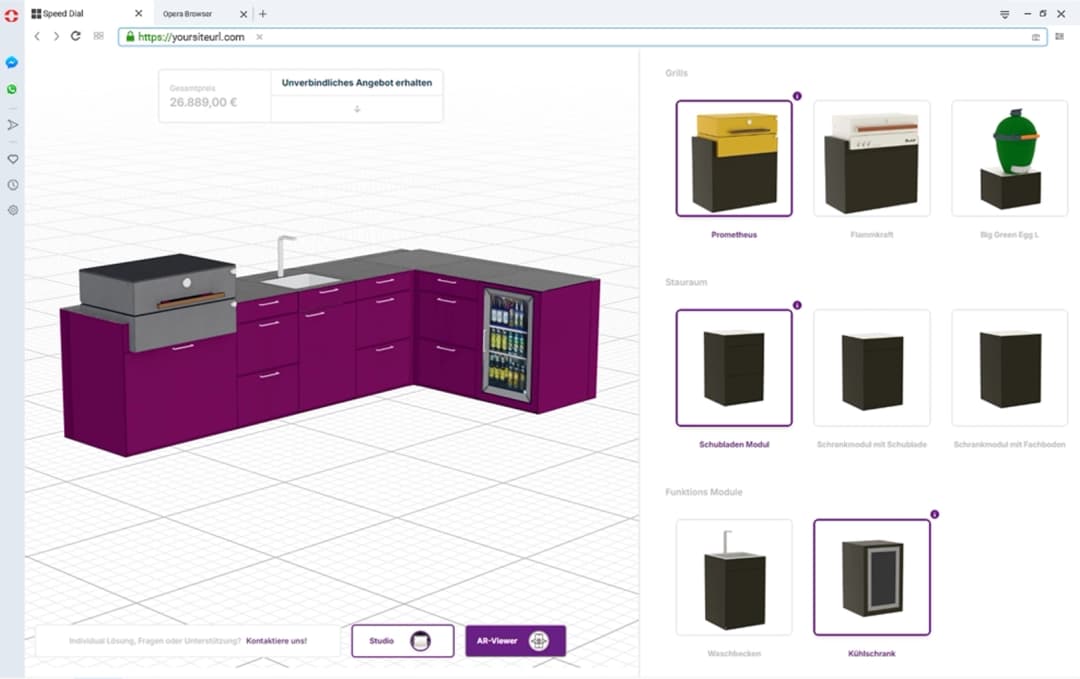
A Shopify product configurator lets shoppers customize products—materials, sizes, modules, artwork, or accessories—directly on your storefront, then add the exact build to cart. The best solutions combine interactive 3D (or rich visual customization), product rules, live pricing, and clean Shopify variant or line-item mapping so orders stay accurate from product page to fulfillment.
This guide explains what a Shopify product configurator is, when you need one, how implementation works, and what to look for when choosing an app or platform.
What is a Shopify product configurator?
Shopify’s native variants work well for simple option sets (size + color). They struggle when:
- Options depend on each other
- Combinations explode into hundreds or thousands of variants
- Buyers need to visualize materials or modular assemblies
- Pricing changes based on complex rules
- Sales needs quotes, not only checkout
A Shopify product configurator extends your store with a dedicated configuration experience. Shoppers build a valid product on the product page (or a dedicated configurator page), see pricing update live, and send a configured line item into Shopify checkout.
Why Shopify brands use product configurators
Higher conversion on complex products
When customers can see and control options interactively, high-consideration products feel safer to buy. Furniture, equipment, custom apparel, and made-to-order goods benefit most.
Fewer returns and support tickets
Better visualization and rule validation reduce “not what I expected” orders and incompatible selections.
Cleaner operations
Configured orders carry structured option data instead of vague note fields. That means fewer remakes and less manual interpretation in production.
Scalable customization without variant explosion
Instead of creating every possible Shopify variant up front, configurators manage combinations through rules and map completed builds into cart intelligently.
Key features to look for
Interactive 3D or visual customization
Shoppers should see materials, dimensions, and modules update in real time. For many catalogs, a 3D product configurator outperforms static swatches alone.
Product rules and guided selling
Compatibility logic prevents invalid builds. Guided steps keep complex catalogs approachable. See guided selling for how rule-based flows work.
Live pricing
Option upcharges, quantity breaks, and commercial rules should update totals as customers configure—not after they reach checkout surprises.
Shopify cart and checkout handoff
The configured product must land in Shopify with enough detail for fulfillment: selected options, SKUs or BOM references, price, and customer-facing summary.
AR previews (optional but powerful)
WebAR helps shoppers place products in their space—especially valuable for furniture and large goods—without installing a separate app.
Admin maintainability
Your team should be able to update options, materials, and rules without rebuilding theme code for every catalog change.
How a Shopify product configurator typically works
- Install and connect the configurator platform to your Shopify store.
- Map products and options so configurable SKUs use your materials, modules, and constraints.
- Define pricing rules for base prices and option deltas.
- Embed the experience on product pages or a dedicated configuration URL.
- Test cart handoff so configured line items appear correctly in checkout and order admin.
- Launch and iterate using conversion and configuration analytics.
With Konfigear’s Shopify integration, brands can connect a 3D configurator workspace, map variants, and start selling customized builds without forcing customers out of the storefront.
Shopify variants vs a dedicated configurator
| Approach | Best for | Limits |
|---|---|---|
| Native Shopify variants | Simple size/color matrices | Variant limits, weak visualization, limited rules |
| Theme option apps | Light personalization | Often weak manufacturability logic |
| Dedicated product configurator | Complex catalogs, 3D, CPQ-style pricing | Requires setup and product modeling |
If your team already fights variant limits, spreadsheet pricing, or “please describe your custom order” notes, you have outgrown native variants.
Industries that benefit most on Shopify
- Furniture and home — materials, modules, dimensions, AR room preview
- Custom apparel — colors, print areas, team stores, production files
- Jewelry — metals, stones, engravings, high-trust visualization
- Industrial and modular products — accessories, compatibility, quote-ready builds
- Made-to-order D2C brands — personalization with operational control
Implementation checklist
Before you launch a Shopify configurator, prepare:
- Product scope — start with one high-impact product family
- Option model — list dependencies, defaults, and invalid combinations
- Pricing model — base price, upcharges, discounts, regional needs
- Visual assets — photos, materials, or web-ready 3D (GLB/glTF)
- Fulfillment requirements — what production needs on every order
- Success metrics — configuration completion, conversion, return rate, AOV
A phased rollout beats trying to configure your entire catalog on day one.
Common mistakes to avoid
- Pretty UI without rules — invalid builds create expensive remakes
- Ignoring mobile — most Shopify traffic is mobile; the experience must perform
- Weak cart mapping — if option details disappear in Shopify admin, ops will hate the tool
- Overbuilding v1 — launch a focused catalog slice, prove ROI, then expand
- No ownership — assign someone to maintain options and pricing after launch
How to choose the right Shopify configurator
Ask vendors:
- How do configured products appear in Shopify orders?
- Can rules enforce manufacturable combinations?
- Does pricing support our commercial logic?
- Can we embed in Online Store 2.0 themes cleanly?
- What happens for multi-currency or multi-market stores?
- How do we update the catalog without developer work every time?
Also evaluate whether you need only storefront customization or a broader platform with CPQ, AR, and integrations beyond Shopify.
Konfigear for Shopify
Konfigear helps Shopify brands sell configurable products with:
- Interactive 3D configuration on product pages
- Guided selling and product rules
- Live pricing aligned to catalog logic
- One-click add to cart with configured details
- Optional AR previews and deeper commerce integrations
Explore the Shopify 3D product configurator integration, review platform capabilities, or request a demo with your product catalog.
Frequently asked questions
Can a Shopify product configurator work with existing themes?
Yes. Most modern solutions embed into product templates or sections so you keep your brand theme while upgrading the product experience.
Do I still need Shopify variants?
Often yes for base products or simple dimensions, but a configurator reduces the need to pre-create every combination as a variant.
Is a 3D configurator required for Shopify customization?
Not always. Some brands start with guided options and pricing. 3D becomes essential when visualization drives purchase confidence.
How long does setup take?
Depends on catalog complexity and assets. Many teams launch a first configurable product family in weeks, then expand.
Next steps
If you sell customizable products on Shopify and native variants are holding you back:
- Identify your most valuable configurable product line
- Map options, rules, and pricing
- Choose a configurator that supports visualization and clean cart handoff
- Launch, measure conversion, and expand
Ready to see it on your catalog? Request a Konfigear demo.